Showing posts sorted by relevance for query genmdm. Sort by date Show all posts

Friday, January 25, 2013

How To: Add a 5-Pin DIN MIDI Input to GenMDM

Overview
GenMDM firmware 102 and above support an old style 5-pin DIN input running at 31250 baud. This is in addition to the USB MIDI input. Both can be used simultaneously.

This tutorial covers how to easily and quickly add a MIDI socket to the GenMDM hardware.


Materials Needed
In this tutorial, breadboarding will be used as this is easy, quick and doesn't require any soldering.

The following items are needed:

• GenMDM interface


• breadboard
• breadboard jumpers


• 4n28 chip
• 1n4148 diode
• 3.3kΩ resistor
• 100kΩ resistor
• 5-pin DIN socket


Step-by-Step Guide

1. Remove the Teensy board from the GenMDM interface PCB


2. Place the Teensy on the breadboard.


3. Place the 4n28 on the breadboard. In the diagram below, pins 3 and 4 are furthest away from the Teensy.


4. Connect 1n4148 diode between pins 1 and 2 of the 4n28 IC. The small stripe should be closest to pin 1.


5. Connect the 100kΩ resistor between pin 6 of the 4n28 IC and the ground bus.


6. Connect the 3.3kΩ resistor between pin5 of the 4n28 IC and the 5V bus.


7. Place the 5-pin DIN socket on the breadboard.


8. Connect the 5C VCC pin from the Teensy board to the 5V bus on the breadboard.


9. Connect the 0V ground pin from the Teensy board to the ground bus on the breadboard.

10. Connect pin 4 of the 4n28 IC to ground.


11. Connect pin 5 of the 5-pin DIN socket to pin 1 of the 4n28 IC.


12. Connect pin 4 of the 5-pin DIN socket to pin 2 of the 4n28 IC.


 13. Connect pin 5 of the 4n28 IC to digital pin 7 (the eighth pin on the left hand side) of the teensy


14. Connect the first pin of the GenMDM interface PCB to the first pin of the teensy board (i.e ground). 

15. Connect the second pin of the GenMDM interface PCB to the second pin of the teensy board.

16. Connect the third pin of the GenMDM interface PCB to the third pin of the teensy board.

17. Connect the fourth pin of the GenMDM interface PCB to the fourth pin of the teensy board.

18. Connect the fifth pin of the GenMDM interface PCB to the fifth pin of the teensy board.

19. Connect the sixth pin of the GenMDM interface PCB to the sixth pin of the teensy board.

20. Connect the seventh pin of the GenMDM interface PCB to the seventh pin of the teensy board.

21. Connect the eighth pin of the GenMDM interface PCB to the eighth pin of the teensy board.

GenMDM Firmware v102


Firmware v102 Version Information: 
* Native MIDI 5 pin DIN support via user-end hardware modification
* This is via the UART RX PIN, found on digital pin 7 of the Teensy board
* More cohesive handling of SSG-EG in terms of mapping - every OP and CH is catered for
* Storage and recall of 15 different RAM-based instruments for VERY quick instrument changes
* Reduced the sample storage ROM area by 2KB
* Simplified and restructured sample code and sample storage ROM area
* The current samples are just some 808 samples - looking to add user-assignable samples


Downloads 
GenMDM v102 Firmware update:
http://little-scale.com/GENMDM/GENMDM_102/GENMDM_102.cpp.hex

GenMDM v102 MIDI mapping text file: 
http://little-scale.com/GENMDM/GENMDM_102/GENMDM_102.txt

GenMDM v102 Editor for OS X:
http://little-scale.com/GENMDM/GENMDM_102/GENMDM_EDITOR_102/GENMDM_EDITOR_102_OSX.zip

GenMDM v102 Editor Source Max Patches (for Cross Platform Use):
http://little-scale.com/GENMDM/GENMDM_102/GENMDM_EDITOR_102/GENMDM_EDITOR_102_SOURCE.zip

GenMDM v102 Max for Live Tools:
http://little-scale.com/GENMDM/GENMDM_102/GENMDM_TOOLS_102_M4L.zip

Firmware Update Tutorial:
http://little-scale.blogspot.com.au/2013/01/how-to-update-genmdm-firmware.html

Friday, May 03, 2013

GenMDM Version 2 PCB 5V Jumper Function

The GenMDM Version 2 PCB contains two main changes to the hardware compared with the Version 1 PCB. These changes are:

• A 5 pin DIN MIDI input connection with associated optocoupler and components
• A 5 volt jumper

The function of the jumper is as follows.

When the jumper is connected, as shows in the photo above, then the SEGA console will power the GenMDM hardware including the 5 pin DIN MIDI input connection.

Use this jumper in the connected position when using the GenMDM with a traditional 5 pin DIN connection. Do not use this jumper in the connected position when using the GenMDM with a USB cable at all. Never connect a USB cable to the GenMDM unit when the jumper is in the connected position. Doing so may damage the GenMDM.
 

When the jumper is disconnected, as shows in the photo above, then USB cable will power the GenMDM hardware. The 5 pin DIN MIDI input connection will not be powered, and a traditional 5 pin DIN connection will not work.

Use this jumper in the connected position when using the GenMDM with a USB cable for MIDI data or for firmware updates. This will provide 5V to the GenMDM hardware via the USB cable.

Sunday, January 12, 2014

GenMDM v103 - Equal TL Mode, FM and PSG Data Capture and Aqcuire Mode


Downloads 
GenMDM v103 Firmware update:
http://little-scale.com/GENMDM/GENMDM_103/GENMDM_103.cpp.hex

GenMDM v103 MIDI mapping text file: 
http://little-scale.com/GENMDM/GENMDM_103/GENMDM_103.txt

GenMDM v102 (will for for 103) Editor for OS X:
http://little-scale.com/GENMDM/GENMDM_102/GENMDM_EDITOR_102/GENMDM_EDITOR_102_OSX.zip

GenMDM v102 (will for for 103) Editor Source Max Patches (for Cross Platform Use):
http://little-scale.com/GENMDM/GENMDM_102/GENMDM_EDITOR_102/GENMDM_EDITOR_102_SOURCE.zip

GenMDM v102 (will for for 103) Max for Live Tools:
http://little-scale.com/GENMDM/GENMDM_102/GENMDM_TOOLS_102_M4L.zip

Firmware Update Tutorial:
http://little-scale.blogspot.com.au/2013/01/how-to-update-genmdm-firmware.html


=====================================================================================
GenMDM Firmware v103 - Quick Reference MIDI Mapping by little-scale

12 January 2014

http://www.little-scale.blogspot.com.au/
seb.tomczak@gmail.com


=====================================================================================
Special thanks to: Freezedream, Lazerbeat, Aly James, Tanikugu, Paul Slocum, Christian Haines, Celsius, Dot.AY, 10k
=====================================================================================
Firmware v103 Version Information:
* Added YM2612 and SN76489 data capture mode
* Added YM2612 and SN76489 data acquire mode
* Added TL Equal mode
=====================================================================================
Firmware v102 Version Information:
* Native MIDI 5 pin DIN support via user-end hardware modification
* This is via the UART RX PIN, found on digital pin 7 of the Teensy board
* More cohesive handling of SSG-EG in terms of mapping - every OP and CH is catered for
* Storage and recall of 15 different RAM-based instruments for VERY quick instrument changes
* Reduced the sample storage ROM area by 2KB
* Simplified and restructured sample code and sample storage ROM area
* The current samples are just some 808 samples - looking to add user-assignable samples
=====================================================================================
Firmware v101 Version Information:
* Added: control of YM2612 FM voice 3 mode
* Added: control of SSG-EG mode
* Added: control of test registers 0x20, 0x27, 0x2A and 0x2C
* Trimmed code
=====================================================================================
MIDI Channel Sound Chip Mapping
* YM2612 FM sound chip is mapped to MIDI channels 1 - 6.
* SN76489 PSG sound chip is mapped to MIDI channels 7 - 10.
* YM2612 FM voice 3 special mode is mapped to MIDI channels 11 - 13.
=====================================================================================
YM2612 FM Sound Chip Mapping
-------------------------------------------------------------------------------------
Parameter                        CC        Data Range
* LFO Enable (Global)                    74        2
* LFO Speed                         1        8   
* Pitch Transposition                    85        128
* Octave Division                    84        128
* PAL / NTSC Tuning                    83        2
* Voice 3 Special Mode                    80        2
* Test Register 0x27 Lowest Six Bits            92        64
* Test Register 0x27 Highest One Bit            93        2
* Test Register 0x20 Lowest Four Bits            94        16
* Test Register 0x20 Highest Four Bits            95        16
* Test Register 0x2C Lowest Four Bits            96        16
* Test Register 0x2C Highest Four Bits            97        16
-------------------------------------------------------------------------------------
Special Mode
* When Voice 3 is in Special Mode, each operator of Voice 3 has its own frequency
* In this case, the frequency for each is controlled using MIDI ch 3, 11, 12 and 13
* In this case, the TL / volume of each operator is controlled via velocity
-------------------------------------------------------------------------------------
Channel / Voice Control                    CC        Data Range
* Preset Instrument Setting Store in RAM        6        16
* Preset Instrument Setting Recall from RAM        9        16
* Frequency                        Note Number    128
* Pitch Bend Amount                    81        18
* FM Algorithm                        14        8
* FM Feedback                        15        8
* Stereo Configuration                    77        4
* Amplitude Modulation Level                76        8
* Frequency Modulation Level                75        8
* SSG-EG Operator 1 On and Setting            90        16
* SSG-EG Operator 2 On and Setting            91        16
* SSG-EG Operator 3 On and Setting            92        16
* SSG-EG Operator 4 On and Setting            93        16
-------------------------------------------------------------------------------------
* The 8 FM algorithms are as follows:
* Algorithm 00: OP1 (m) --> OP2(m)  --> OP3 (m) --> OP4 (c)
* Algorithm 01: OP1 (m) && OP2 (m) --> OP3 (m) --> OP4 (c)
* Algorithm 02: (OP1 (m) && (OP2 (m) --> OP3 (m))) --> OP4 (c)
* Algorithm 03: ((OP1 (m) --> OP2 (m)) && OP3 (m)) --> OP4 (c)
* Algorithm 04: OP1 (m) --> OP2 (c) && OP3 (m) --> OP4 (c)
* Algorithm 05: OP1 (m) --> (OP2 (c) && OP3 (c) && OP4 (c))
* Algorithm 06: OP1 (m) --> OP2 (c) && OP3 (c) && OP4 (c)
* Algorithm 07: OP1 (c) && OP2 (c) && OP3 (c) && OP4 (c)
-------------------------------------------------------------------------------------
Operator Control                     CC        Data Range
* Total Level OP 1                    16        128
* Total Level OP 2                    17        128
* Total Level OP 3                    18        128
* Total Level OP 4                    19        128
* Multiple OP 1                        20        16
* Multiple OP 2                        21        16
* Multiple OP 3                        22        16
* Multiple OP 4                        23        16
* Detune OP 1                        24        8
* Detune OP 2                        25        8
* Detune OP 3                        26        8
* Detune OP 4                        27        8
* Rate Scaling OP 1                    39        4
* Rate Scaling OP 2                    40        4
* Rate Scaling OP 3                    41        4
* Rate Scaling OP 4                    42        4
* Attack Rate OP 1                    43        32
* Attack Rate OP 2                    44        32
* Attack Rate OP 3                    45        32
* Attack Rate OP 4                    46        32
* First Decay Rate OP 1                    47        32
* First Decay Rate OP 2                    48        32
* First Decay Rate OP 3                    49        32
* First Decay Rate OP 4                    50        32
* Secondary Decay Rate OP 1                51        16
* Secondary Decay Rate OP 2                52        16
* Secondary Decay Rate OP 3                53        16
* Secondary Decay Rate OP 4                54        16
* Secondary Amplitude Level OP 1            55        16
* Secondary Amplitude Level OP 2            56        16
* Secondary Amplitude Level OP 3            57        16
* Secondary Amplitude Level OP 4            58        16
* Release Rate OP 1                    59        16
* Release Rate OP 2                    60        16
* Release Rate OP 3                    61        16
* Release Rate OP 4                    62        16
* Amplitude Modulation Enable OP 1            70        2
* Amplitude Modulation Enable OP 2            71        2
* Amplitude Modulation Enable OP 3            72        2
* Amplitude Modulation Enable OP 4            73        2
-------------------------------------------------------------------------------------
DAC Control (MIDI Channel 6)                 CC        Data Range
* DAC Enable                        78        2
* DAC Direct Data                    79        128
* DAC Sample Pitch Speed                86        128
* DAC Sample Oversample                    88        16
* DAC Noise  / Custom Wave Mode                89        2
* Custom Wave Byte 1 of 14                100        128
* Custom Wave Byte 2 of 14                101        128
* Custom Wave Byte 3 of 14                102        128
* Custom Wave Byte 4 of 14                103        128
* Custom Wave Byte 5 of 14                104        128
* Custom Wave Byte 6 of 14                105        128
* Custom Wave Byte 7 of 14                106        128
* Custom Wave Byte 8 of 14                107        128
* Custom Wave Byte 9 of 14                108        128
* Custom Wave Byte 10 of 14                109        128
* Custom Wave Byte 11 of 14                110        128
* Custom Wave Byte 12 of 14                111        128
* Custom Wave Byte 13 of 14                112        128
* Custom Wave Byte 14 of 14                113        128
===================================================================================== SN76489 PSG Sound Chip Mapping
-------------------------------------------------------------------------------------
Global Control                         CC        Data Range
* Pitch Transposition                    85        128
* PAL / NTSC                        83        2
-------------------------------------------------------------------------------------
Noise Channel Control                    Type
* C and C#                        High Frequency; Periodic Type
* D and D#                        Medium Frequency; Periodic Type
* E                            Low Frequency; Periodic Type
* F                            High Frequency; Noise Type
* F#                            Medium Frequency; Noise Type
* G and G#                        Low Frequency; Noise Type
* A and A#                        Channel 9; Periodic Type
* B                            Channel 9; Noise Type
=====================================================================================
Other   
-------------------------------------------------------------------------------------
Generate VGM Files (Experimental)            CC        Data Range
-------------------------------------------------------------------------------------
* Enable / Disable data capture mode            114        2
* Enable data acquire mode                115        2
* Disable data acquire mode                Ch 16 Note 127
=====================================================================================

Tuesday, June 19, 2012

GenMDM Global Strip - Max for Live Device


Description
This Max for Live MIDI effect device controls the global parameters of the GenMDM SEGA FM chip. Only one instance of the device is needed per GenMDM unit.

This MIDI effect devices allows for the control and automation of the following parameters: 
• Bend amount in semitones
• Octave division (default is 12, of course)
• Transpose
• NTSC or PAL tuning mode
• LFO enabled
• LFO speed

All of these parameters can normally be controlled via MIDI CC data, however the GenMDM Global strip makes the process more user-friendly as well as integrated into Live's automation and mapping environment. 


Basic Usage:
1) Connect the GenMDM as per usual
2) Create a new audio track in Live. Route the SEGA Mega Drive / Genesis audio output to the track
3) Create a new MIDI track in Live. Route the output of the MIDI track to any GenMDM channel 1 - 6.
4) Add a copy of GenMDM Global Strip to the blank MIDI track.
5) Sequence note and velocity data as per normal. 
6) Change the parameters of the GenMDM Global Strip - you will hear the corresponding changes in sound.

Monday, June 18, 2012

GenMDM FM Channel Strip - Max for Live Device


Description
This Max for Live MIDI effect device controls the FM synthesis parameters of the GenMDM channels 1 - 6 (corresponding to the YM2612 FM channels 1 - 6). 

This MIDI effect devices allows for the control and automation of the following parameters: 
• preset
• algorithm
• LFO FM amount
• feedback
• panning
• LFO AM amount
• FM operator 1, 2, 3 and 4 level
• FM operator 1, 2, 3 and 4 detune
 • FM operator 1, 2, 3 and 4 attack
• FM operator 1, 2, 3 and 4 decay 1
• FM operator 1, 2, 3 and 4 decay 2
• FM operator 1, 2, 3 and 4 multiple
• FM operator 1, 2, 3 and 4 rate scale
• FM operator 1, 2, 3 and 4 amp 2
• FM operator 1, 2, 3 and 4 release
• FM operator 1, 2, 3 and 4 LFO AM on

All of these parameters can normally be controlled via MIDI CC data, however the GenMDM FM channel strip makes the process more user-friendly as well as integrated into Live's automation and mapping environment.


Basic Usage:
1) Connect the GenMDM as per usual
2) Create a new audio track in Live. Route the SEGA Mega Drive / Genesis audio output to the track
3) Create one or more new MIDI tracks in Live. Route the output of each MIDI track to GenMDM, between channels 1 - 6.
4) Add a copy of GenMDM FM Channel Strip to each blank MIDI track for each FM channel that should be controlled.
5) Sequence note and velocity data as per normal. 
6) Change the parameters of the GenMDM FM Channel Strip - you will hear the corresponding changes in sound.

Tuesday, January 22, 2013

GenMDM Firmware v101

Firmware v101 Version Information
* Added: control of YM2612 FM voice 3 mode
* Added: control of SSG-EG mode
* Added: control of test registers 0x20, 0x27, 0x2A and 0x2C
* Trimmed code


Downloads
GenMDM v101 Firmware update:
http://little-scale.com/GENMDM/GENMDM_101/GENMDM_101.cpp.hex

GenMDM v101 MIDI mapping text file:
http://little-scale.com/GENMDM/GENMDM_101/GENMDM_101.txt

GenMDM v101 Max for Live Tools:
http://little-scale.com/GENMDM/GENMDM_101/GENMDM_101_M4L.zip

Firmware Update Tutorial:
http://little-scale.blogspot.com.au/2013/01/how-to-update-genmdm-firmware.html


Startup Sound

Monday, June 18, 2012

GenMDM DAC Channel Strip - Max for Live Device


Description
This Max for Live MIDI effect device controls the DAC parameters of the GenMDM channel 6 - which corresponds to YM2612 FM channel 6 in DAC mode. 
This MIDI effect devices allows for the control and automation of the following parameters: 
• DAC on
• Oversample amount (i.e. pitch bend up)
• Sample rate change amount (i.e. pitch bend down)
• Custom waveform amount
• Custom waveform shape

All of these parameters can normally be controlled via MIDI CC data, however the GenMDM DAC channel strip makes the process more user-friendly as well as integrated into Live's automation and mapping environment. 


Basic Usage:
1) Connect the GenMDM as per usual
2) Create a new audio track in Live. Route the SEGA Mega Drive / Genesis audio output to the track
3) Create a new MIDI tracks in Live. Route the output of the MIDI track to GenMDM channel 6
4) Add a copy of GenMDM FM Channel Strip to the blank MIDI track.
5) Sequence note and velocity data as per normal. 
6) Change the parameters of the GenMDM DAC Channel Strip - you will hear the corresponding changes in sound.

Friday, February 01, 2013

Screencast: Batch Conversion Tool for TFI Instruments to GenMDM Patches


I made a batch conversion tool for converting many TFI FM instrument files to GENM instrument patches. Each TFI instrument file is just for a single instrument setting. GenMDM file patches are for up to 128 instruments per file. This allows for the conversion of the instruments from whole game sound tracks for convenient use with GenMDM.

You can download this tool here:

TFI2GENM source file: http://little-scale.com/GENMDM/GENMDM_APPS/TFI2GENM/TFI2GENM_SOURCE/TFI2GENM.maxpat.zip

TFI2GENM compiled for OS X: http://little-scale.com/GENMDM/GENMDM_APPS/TFI2GENM/TFI2GENM_OSX/TFI2GENM.zip

TFI SEGA Instruments with friendly names: http://little-scale.com/GENMDM/TFI_SEGA_INSTRUMENTS/TFI_WITH_FRIENDLY_NAMES.zip

Tuesday, January 29, 2013

GenMDM Polyphonic Handling App

// GDAY M8s //

Normally, the GenMDM is monophonic i.e. each MIDI channel is directly mapped to a chip voice (1 - 6 for FM, 7 - 10 for PSG). As a result, each MIDI channel can only play one note at a time, as a single chip voice can only make one sound at a time.

Tonight I made a simple polyphonic handler for both the FM chip and the PSG chip of the SEGA Mega Drive. 


Usage is very simple: 
• Create a MIDI track in Live / Logic / ProTools / whatever
• Sequence a chord on this track with up to 6 notes
• Send the output of this track along channel 1 of a virtual MIDI bus (e.g. IAC MIDI bus 1 for OS X)
• In the GENMDM_POLY app, choose the same virtual MIDI bus as the input
• In the GENMDM_POLY app, choose the GenMDM as the output
• The level of polyphony for the FM and PSG chips are set by the user (2 - 6 voices for the FM and 2 - 3 voice for the PSG)
• Chords will automatically routed to GenMDM channels 1 - 6 without any effort whatsoever
• If you gave a stuck note, use the "KILL NOTES" button to stop it
• A chord with up to six notes should be routed to the FM chip via MIDI channel 1 (channels 2 - 6 should not be used)
• A chord with up to three notes should be routed to the PSG chip via MIDI channel 7 (channels 7 - 10 should not be used)


// THANKS FOR WATCHING && TREAD UR OWN PATH //

Sunday, March 31, 2013

GenMDM PCB Version 1 Modification: SEGA Console Power

The GenMDM interface version 1 PCB can be powered from the SEGA console by performing this simple modification.

This modification will reduce noise in the audio output of the SEGA console, but it will also render the Teensy microcontroller board unable to be powered via USB cable alone.

This may make it unsuitable for people that wish to use their GenMDM Teensy boards for other things.


Take a GenMDM version 1 PCB.


Solder a wire to pin 5 of the 9-pin connector.


Solder the other end of the wire to the VCC pin header of the Teensy socket


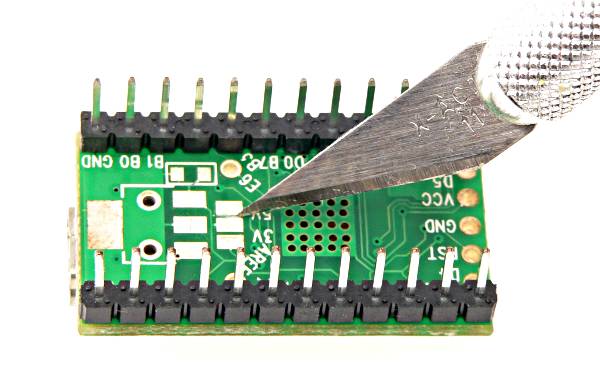
Take your GenMDM Teensy. Note the underside. There is a series of three pads marked 3V 5V. Cut the trace that is between the middle pad and the pad next to the 5V sign. A clear diagram is given here.


This is the Teensy after the trace has been cut. Ensure that there is not connection between the two pads by using a multimeter to check resistance (or lack thereof).

Insert the Teensy board back into the cradle.

Tuesday, January 22, 2013

How to: Update the GenMDM Firmware

1. Go to http://www.pjrc.com/teensy/loader.html and download the Teensy loader application for your operating system.


2. Locate and download the GenMDM firmware update file. This file will always have the name of GENMDM_NNN.cpp.hex, where NNN is the version number. The file type will always be .cpp.hex.


3. Open the Teensy loader application, and drag and drop the .cpp.hex file. You can also go to File > Open HEX File. 


4. Click on the 'Auto' button. 


5. Connect your GenMDM interface via a USB cable, and click the tiny black button on the top of the interface. If your GenMDM interface and SEGA is hooked up so that you can hear the sound, you should be able to hear the updated version loading sound. This indicates that the firmware has been loaded successfully!


Saturday, May 31, 2014

GenMDM 103 Channel Fix!

GenMDM 103 had a serious flaw - the channel numbering was off. Channel 5 was DAC, instead of 6. Channel 9 was noise, instead of 10. And so on. 

This fixed version of GenMDM 103 firmware will fix this issue.

http://little-scale.com/GENMDM/GENMDM_103/GENMDM_103.cpp.hex

Monday, January 28, 2013

GenMDM TFI Import Function

I've added a TFI import function for the GenMDM Max for Live tool.

Chipmusic.org user Robugaa has posted a collection of every instrument from every SEGA Genesis / Mega Drive game in TFI format.

What this will mean is that every instrument from every SEGA Genesis / Mega Drive game will be useable in GenMDM.

Here you can see that I am importing instruments from Streets of Rage 1!


Saturday, February 02, 2013

GenMDM M4L Tools Updated - Now Includes TFI and TFI Folder Import!


The FM editor for GenMDM M4L Tools has been updated to include TFI import and TFI folder import. A TFI file is an FM instrument file from TFM Music Maker. Each TFI file is a single FM instrument. The "TFI" button imports a single TFI file.

The "TFI F" button imports up to 128  instruments from a folder containing 128 or less TFI files - e.g. a SEGA Genesis / Mega Drive instrument settings dump. These instruments are imported into the patch instrument menu. See below for usage examples!

Download all SEGA Genesis / Mega Drive TFI instruments with friendly names here: http://little-scale.com/GENMDM/TFI_SEGA_INSTRUMENTS/TFI_WITH_FRIENDLY_NAMES.zip . Many thanks to Chipmusic.org user Robugaa for importing and converting these files from the .OPM files.

Example of importing a single TFI instrument file:


Example of importing a folder full of TFI instrument files:

Friday, September 07, 2012

GenMDM Tools Max for Live Update


I've updated the GenMDM tools for Max for Live.  

The updates include:
• A new GUI for the FM editor
• Added a "data dump" button that can be pressed in the GUI or it can be activated by sending a note-on 127
• The idea with the data dump is that multiple MIDI tracks in Live with different settings can be fed into the one GenMDM MIDI channel - and settings can be dumped dynamically as a song plays back• Increased reliability / stability
• Fixed a bug that caused delays at times with MIDI data
• Fixed a bug that caused dropouts at times with MIDI data


Download here: http://milkcrate.com.au/_other/downloads/chipTools/GenMDM_Tools_M4L/GenMDM_Tools_M4L_20120907.zip

Saturday, February 02, 2013

.GENM File Format: GenMDM Instrument Patch File Specifications


A .GENM file is used to store GenMDM patch files.

Each patch file can store up to 128 different instrument settings for an FM channel of a GenMDM interface.

A .GENM file is in a standard text format.

Each instrument is stored in the following way:
[Instrument Index], [Algorithm] [LFO FM] [LFO AM] [FM Feedback] [Panning] [OP1 Level] [OP2 Level] [OP3 Level] [OP4 Level] [OP1 Detune] [OP2 Detune] [OP3 Detune] [OP4 Detune] [OP1 Attack] [OP2 Attack] [OP3 Attack] [OP4 Attack] [OP1 Decay 1] [OP2 Decay 1] [OP3 Decay 1] [OP4 Decay 1] [OP1 Decay 2] [OP2 Decay 2] [OP3 Decay 2] [OP4 Decay 2] [OP1 Mul] [OP2 Mul] [OP3 Mul] [OP4 Mul] [OP1 Rate Scaling] [OP2 Rate Scaling] [OP3 Rate Scaling] [OP4 Rate Scaling] [OP1 Amp2] [OP2 Amp2] [OP3 Amp2] [OP4 Amp2] [OP1 Release] [OP2 Release] [OP3 Release] [OP4 Release] [OP1 LFO Enable] [OP2 LFO Enable] [OP3 LFO Enable] [OP4 LFO Enable] [OP1 SSG Data] [OP2 SSG Data] [OP3 SSG Data] [OP4 SSG Data] [Instrument Name Symbol String];

• Instrument index is indexed at 0
• Instrument index does not need need to be in order in the file
• TL is given as 127 - TL for each level parameter for each operator
• LFO enable is 0 for not enabled, 1 for enabled
• All other data fields are given as actual register data, not unscaled raw data
• Instrument name can be up to 256 characters long